The main screen of the Freq maker, where the player picks a prefab Freq or a random one, opens the custom screen, types the name of the Freq, and saves it. More...
#include <freqmakermainscreen.h>
Public Member Functions | |
| FreqMakerMainScreen (DataArray *pData) | |
| Construct the screen from its script description. | |
| ~FreqMakerMainScreen () override | |
| Destroy the screen. | |
| bool | DispatchPriv (Message *pMsg) override |
| Route chosen buttons, focus changes, controller buttons, and the end of the entry, and pass on every other message. | |
| void | Enter (UIScreen *pPrevScreen, float fTime) override |
| Show the Freq and list the prefabs, then start the entry. | |
| void | Exit (UIScreen *pNextScreen, float fTime) override |
| Start the exit, and turn the camera to the bust of the Freq unless the custom screen follows. | |
| void | Undo () override |
| Restore the profile the screen started from and forget the name. | |
| int | ReceiveKeyboardText (const char *pszText) override |
| Receive the name the player typed, and go to the save screen when saving waits for it. | |
| DataArray * | FindPrefab (const char *pszPrefab) |
| Find the description of a prefab among the prefabs and locked_prefabs of the metagame configuration. | |
| void | OpenKeyboard () |
| Open the keyboard to type the name, starting from the current name or player_1. | |
| void | ShowSaveHelp (UIComponent *pComponent) |
| Show the help of the save button, naming the memory card. | |
| void | GotoSave () |
| Give the first player the name and mark the profile as the player's own, then go to the save screen. | |
| bool | HandleFocusChange (UIComponentFocusChangeMsg *pMsg) |
| Show the help of the component that received the focus. | |
| bool | HandleTransitionComplete (UITransitionCompleteMsg *pMsg) |
| Show the help of the focused component once this screen has entered. | |
| bool | HandleSelect (UIComponentSelectMsg *pMsg) |
| Go to the save screen when save was chosen with the cross button. | |
| bool | HandleSelectStart (UIComponentSelectStartMsg *pMsg) |
| Act on a button about to be chosen. | |
| bool | HandleJoypad (JoypadInputMsg *pMsg) |
| Return to the Freq menu on the triangle button, through f_maker_lose_main_changes when the Freq changed. | |
| void | SetSaveStarted (int nSaveStarted) |
| void | SetEditing (int nEditing) |
| void | SetFreqName (const char *pszFreqName) |
| void | SetProfile (Campaign profile) |
| Public Member Functions inherited from FreqMakerUndoScreen | |
| FreqMakerUndoScreen (DataArray *pData) | |
| Construct the screen from its script description. | |
| Public Member Functions inherited from FreqScreen | |
| FreqScreen (DataArray *pData) | |
| Construct a screen from its script description. | |
| ~FreqScreen () override | |
| Destroy the screen. | |
| bool | DispatchPriv (Message *pMsg) override |
| Play the sound of a chosen component, follow a shortcut, and keep unused controllers out. | |
| void | Draw () override |
| Draw what goes under each panel, then the panels. | |
| void | Exit (UIScreen *pNextScreen, float fTime) override |
| Move the projector to the next screen's place and start the exit. | |
| void | Enter (UIScreen *pPrevScreen, float fTime) override |
| Play the entry sound, show or hide the projector, and start the entry. | |
| virtual const char * | Title () |
| Report the localised title of the screen, the token <name>_TITLE. | |
| virtual void | PlayButtonSound (int nButton) |
| Play the menu sound of a controller button. | |
| bool | HandleSelectStart (UIComponentSelectStartMsg *pMsg) |
| Play the sound of the button that chooses a component. | |
| bool | HandleTransitionComplete (UITransitionCompleteMsg *pMsg) |
| Choose the component the shortcuts section of the metagame configuration lists for the screen. | |
| bool | HandleJoypad (JoypadInputMsg *pMsg) |
| Pass on a controller button of a controller the players use, and swallow any other. | |
| Public Member Functions inherited from UIScreen | |
| UIScreen (DataArray *pData) | |
| Construct a screen from its script description. | |
| ~UIScreen () override | |
| Destroy the screen. | |
| bool | Dispatch (Message *pMsg) override |
| Offer a message to the manager, then handle it here, then pass a navigation message on. | |
| bool | DispatchPriv (Message *pMsg) override |
| Follow the transition of a pressed button or a chosen component. | |
| virtual void | Poll (float fTime) |
| Advance the panels to a time, and finish the exit or the entry once their animations stop. | |
| virtual void | Print (PrnStream &stream) |
| Write a description of the screen, its panels, and its transitions. | |
| void | ClearTransitions () |
| Empty the transition table. | |
| void | AddTransition (const char *pszComponent, int nButton, const char *pszScreen) |
| Append an entry to the transition table. | |
| void | AddPanel (UIPanel *pPanel) |
| Add a panel to the screen. | |
| bool | HandleJoypad (JoypadInputMsg *pMsg) |
| Follow the transition of a pressed controller button. | |
| bool | HandleSelect (UIComponentSelectMsg *pMsg) |
| Follow the transition of a component chosen with the cross button. | |
| void | SetFocus (UIPanel *pPanel) |
| Move the focus to a panel. | |
| UIComponent * | FindComponent (const char *pszName) |
| Find a component on any of the screen's panels. | |
| Transition * | FindTransition (UIComponent *pComponent, bool bFail) |
| Find the transition of a component. | |
| Transition * | FindTransition (int nButton, bool bFail) |
| Find the transition of a controller button. | |
| void | Load () |
| Load the panels. | |
| void | Unload () |
| Unload the panels. | |
| bool | IsLoaded () |
| Report whether every panel has loaded. | |
| const char * | GetName () const |
| const char * | GetGroup () const |
| UIPanel * | GetFocusPanel () const |
| UIScreen * | GetNextScreen () const |
| UIScreen * | GetPrevScreen () const |
| const std::map< const char *, UIPanel *, StrLess > & | GetPanels () const |
| Public Member Functions inherited from MsgSink | |
| void * | operator new (size_t nSize) |
| Allocate a sink from the pool heaps under the tag "MsgSink". | |
| void | operator delete (void *pBlock) |
| Return a sink to the pool heaps. | |
| virtual | ~MsgSink () |
| void * | operator new (size_t size) |
| Allocate from the main heap under the name MsgSink. | |
| void | operator delete (void *mem) |
| Return memory to its heap. | |
| virtual | ~MsgSink () |
| Destroy the sink. | |
| Public Member Functions inherited from KeyboardUser | |
| virtual | ~KeyboardUser () |
| Destroy the mix-in. | |
Static Public Member Functions | |
| static UIScreen * | New (DataArray *pData) |
| Create a screen from its script description. | |
| Static Public Member Functions inherited from FreqScreen | |
| static UIScreen * | New (DataArray *pData) |
| Create a screen from its script description. | |
| Static Public Member Functions inherited from UIScreen | |
| static UIScreen * | New (DataArray *pData) |
| Create a screen from its script description. | |
Additional Inherited Members | |
| Public Attributes inherited from FreqScreen | |
| Vector3 | mGizmoOrig |
| Quat | mGizmoRot |
| Protected Attributes inherited from UIScreen | |
| const char * | mName |
| const char * | mGroup |
| std::map< const char *, UIPanel *, StrLess > | mPanels |
| UIPanel * | mFocusPanel |
| std::vector< Transition > | mTransitions |
| UIScreen * | mPrevScreen |
| UIScreen * | mNextScreen |
| int | mForceEntryExit |
Detailed Description
The main screen of the Freq maker, where the player picks a prefab Freq or a random one, opens the custom screen, types the name of the Freq, and saves it.
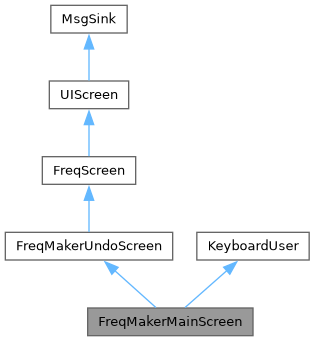
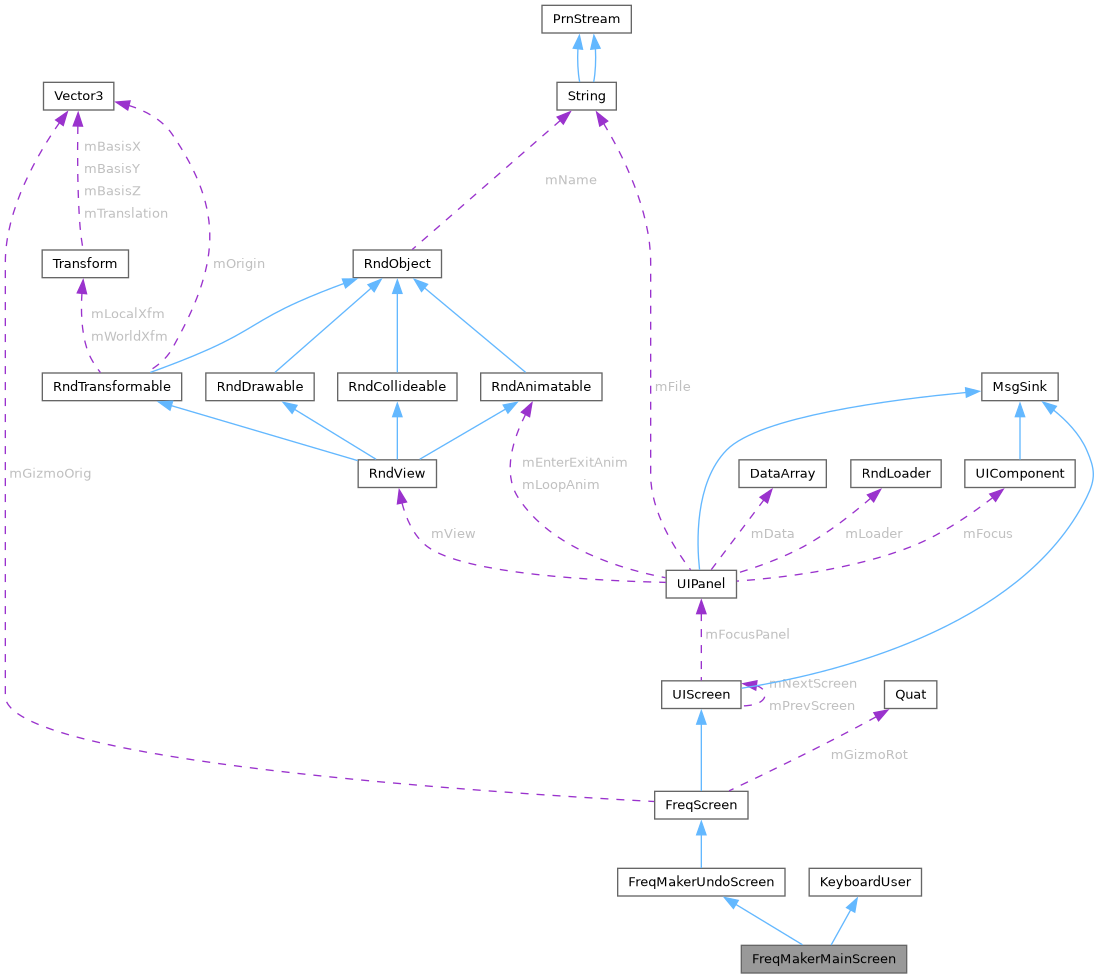
The RTTI records the class as deriving from FreqMakerUndoScreen and from KeyboardUser at +0x70. The object is 0x1c0 bytes and its vtables are at 0x003cfeb8 and, for KeyboardUser, 0x003cfe98. The metagame registers the class for the screen type f_maker_main_screen, and the front-end description's f_maker screen is one. Its f_maker panel has the buttons prefabs, random, custom, name, and save, and its f_maker_p AvatarPanel shows the Freq of the first player. The screen edits the Freq in place.
FreqConfirmScreen prepares the screen before it opens. Saving hands the Freq to the fmaker_save_freq SaveEditedFreqScreen, or to fmaker_save_freq_net online.
Constructor & Destructor Documentation
◆ FreqMakerMainScreen()
|
explicit |
Construct the screen from its script description.
- Parameters
-
pData The script description.
- Ghidra address:
- NTSC-U/C: 0x00360d28
- Ghidra address:
- PAL: 0x003cf240
◆ ~FreqMakerMainScreen()
|
override |
Destroy the screen.
- Ghidra address:
- NTSC-U/C: 0x00360c68
- Ghidra address:
- PAL: 0x003cf180
Member Function Documentation
◆ New()
Create a screen from its script description.
The metagame registers the routine for the entry type f_maker_main_screen.
- Parameters
-
pData The script description.
- Returns
- The new screen.
- Ghidra address:
- NTSC-U/C: 0x00360c28
- Ghidra address:
- PAL: 0x003cf140
◆ DispatchPriv()
|
overridevirtual |
Route chosen buttons, focus changes, controller buttons, and the end of the entry, and pass on every other message.
- Parameters
-
pMsg The message.
- Returns
- Whether the message was handled.
- Ghidra address:
- NTSC-U/C: 0x001a0338
- Ghidra address:
- PAL: 0x001a8018
Implements MsgSink.
◆ Enter()
|
overridevirtual |
Show the Freq and list the prefabs, then start the entry.
Entering from a screen outside the Freq maker forgets the typed name. A new Freq that has not gone to the save screen yet starts again from a default profile and the first prefab. Returning from the keyboard checks the typed name, sending an empty name or one with spaces at either end to no_empty_filename_screen or no_lead_trail_spaces_screen, and otherwise moves the focus to save. The name of the Freq is written on f_maker_p_01.txt.
- Parameters
-
pPrevScreen The screen this one replaces. fTime The front-end time in milliseconds.
- Ghidra address:
- NTSC-U/C: 0x0019eb48
- Ghidra address:
- PAL: 0x001a6860
Reimplemented from UIScreen.
◆ Exit()
|
overridevirtual |
Start the exit, and turn the camera to the bust of the Freq unless the custom screen follows.
- Parameters
-
pNextScreen The screen that replaces this one, or null. fTime The front-end time in milliseconds.
- Ghidra address:
- NTSC-U/C: 0x0019f5b8
- Ghidra address:
- PAL: 0x001a7200
Reimplemented from UIScreen.
◆ Undo()
|
overridevirtual |
Restore the profile the screen started from and forget the name.
- Ghidra address:
- NTSC-U/C: 0x0019f938
- Ghidra address:
- PAL: 0x001a7588
Implements FreqMakerUndoScreen.
◆ ReceiveKeyboardText()
|
overridevirtual |
Receive the name the player typed, and go to the save screen when saving waits for it.
- Parameters
-
pszText The name.
- Returns
- Zero when the save screen opened, otherwise 1.
- Ghidra address:
- NTSC-U/C: 0x0019f7b8
- Ghidra address:
- PAL: 0x001a7400
Implements KeyboardUser.
◆ FindPrefab()
| DataArray * FreqMakerMainScreen::FindPrefab | ( | const char * | pszPrefab | ) |
Find the description of a prefab among the prefabs and locked_prefabs of the metagame configuration.
- Parameters
-
pszPrefab The prefab, a symbol.
- Returns
- The description, or null.
- Ghidra address:
- NTSC-U/C: 0x0019f6e8
- Ghidra address:
- PAL: 0x001a7330
◆ OpenKeyboard()
| void FreqMakerMainScreen::OpenKeyboard | ( | ) |
Open the keyboard to type the name, starting from the current name or player_1.
- Ghidra address:
- NTSC-U/C: 0x0019f828
- Ghidra address:
- PAL: 0x001a7470
◆ ShowSaveHelp()
| void FreqMakerMainScreen::ShowSaveHelp | ( | UIComponent * | pComponent | ) |
Show the help of the save button, naming the memory card.
- Parameters
-
pComponent The component that has the focus.
- Ghidra address:
- NTSC-U/C: 0x0019f9f0
- Ghidra address:
- PAL: 0x001a7640
◆ GotoSave()
| void FreqMakerMainScreen::GotoSave | ( | ) |
Give the first player the name and mark the profile as the player's own, then go to the save screen.
Saving under another name than the profile's, or saving a new Freq, never overwrites a saved Freq.
- Ghidra address:
- NTSC-U/C: 0x0019fa88
- Ghidra address:
- PAL: 0x001a7768
◆ HandleFocusChange()
| bool FreqMakerMainScreen::HandleFocusChange | ( | UIComponentFocusChangeMsg * | pMsg | ) |
Show the help of the component that received the focus.
- Parameters
-
pMsg The message.
- Returns
- False.
- Ghidra address:
- NTSC-U/C: 0x0019fc28
- Ghidra address:
- PAL: 0x001a7908
◆ HandleTransitionComplete()
| bool FreqMakerMainScreen::HandleTransitionComplete | ( | UITransitionCompleteMsg * | pMsg | ) |
Show the help of the focused component once this screen has entered.
- Parameters
-
pMsg The message.
- Returns
- False.
- Ghidra address:
- NTSC-U/C: 0x0019fc58
- Ghidra address:
- PAL: 0x001a7938
◆ HandleSelect()
| bool FreqMakerMainScreen::HandleSelect | ( | UIComponentSelectMsg * | pMsg | ) |
Go to the save screen when save was chosen with the cross button.
- Parameters
-
pMsg The message.
- Returns
- The result of UIScreen::HandleSelect().
- Ghidra address:
- NTSC-U/C: 0x0019fca0
- Ghidra address:
- PAL: 0x001a7980
◆ HandleSelectStart()
| bool FreqMakerMainScreen::HandleSelectStart | ( | UIComponentSelectStartMsg * | pMsg | ) |
Act on a button about to be chosen.
The cross button on random gives every part but the right arm and the instrument a random unlocked choice and colour, and the torso a random emblem. On save without a typed name, or with the name Player 1, it opens the keyboard and saves once the name arrives. On name it opens the keyboard, or f_maker_name_locked_screen when the name is locked. Left and right on prefabs step through the prefabs.
- Parameters
-
pMsg The message.
- Returns
- True when the keyboard opened or a prefab was loaded, otherwise the result of FreqScreen::HandleSelectStart().
- Ghidra address:
- NTSC-U/C: 0x0019fd10
- Ghidra address:
- PAL: 0x001a79f0
◆ HandleJoypad()
| bool FreqMakerMainScreen::HandleJoypad | ( | JoypadInputMsg * | pMsg | ) |
Return to the Freq menu on the triangle button, through f_maker_lose_main_changes when the Freq changed.
- Parameters
-
pMsg The message.
- Returns
- True while the screen moves, otherwise the result of FreqScreen::HandleJoypad().
- Ghidra address:
- NTSC-U/C: 0x001a0198
- Ghidra address:
- PAL: 0x001a7e78
◆ SetSaveStarted()
|
inline |
- Parameters
-
nSaveStarted Non-zero once the Freq went to the save screen.
◆ SetEditing()
|
inline |
- Parameters
-
nEditing 1 when the screen edits the player's Freq, 0 for a new one.
◆ SetFreqName()
|
inline |
- Parameters
-
pszFreqName The name of the Freq.
◆ SetProfile()
|
inline |
- Parameters
-
profile The profile the screen started from.
The documentation for this class was generated from the following file:
- src/met/freqmakermainscreen.h