Pick which browser—and which profile—to use when opening a link.
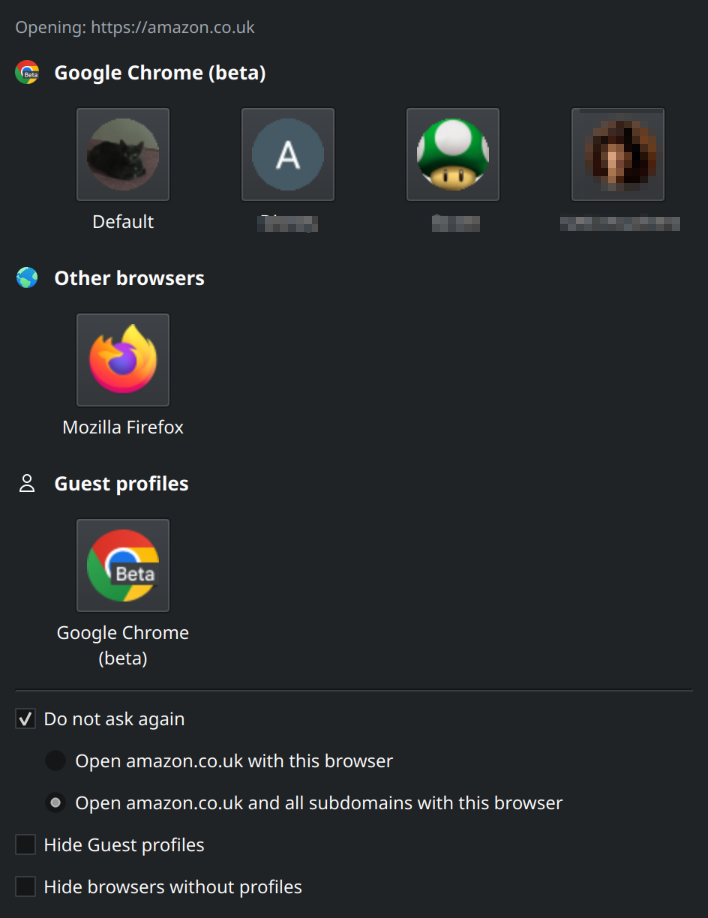
Set Browser Chooser to your default browser and when you click on URLs in non-browsers, it will display a simple dialogue so you can choose the right browser or profile to use, and optionally remember your choice per domain.
Why use this?
- Work vs personal profiles or browsers - Open work links in a dedicated profile and personal links in another.
- Security and isolation - Use a separate browser or profile for banking, social, or untrusted sites.
Features
- Cross-platform - Works on Linux (XDG desktop entries), macOS (
.appbundles), and Windows (registry-based discovery). - Browser discovery - Detects Chrome, Firefox, Edge, Brave, Chromium, Opera, Safari (macOS), and other common browsers.
- Profile support - Lists Chrome/Chromium and Firefox profiles by name, with profile pictures for Chromium-based browsers (when available).
- Guest profiles - Buttons to open Guest profiles in browsers.
- Remember per domain - 'Do not ask again' saves your selection for the domain so the same browser/profile opens next time.
- Configurable filtering - Hide specific browsers or turn off profile listing for chosen browsers via config (e.g.
Advanced/hideBrowsers,Advanced/hideProfileBrowsers). On macOS you can use bundle IDs (e.g.com.apple.Safari). - Pre and post-launch commands - Run commands before or after launching a given browser or profile; keys are per browser (or per browser+profile).
Configuration
The configuration file is INI format. Location is platform-dependent:
| OS | Location |
|---|---|
| Linux | ~/.config/browserchooserrc |
| macOS | ~/Library/Preferences/browserchooserrc |
| Windows | APPDATA%\browserchooserrc |
Pre-launch and post-launch commands
You can run commands before and after starting a specific browser or browser/profile.
The value format is a JSON-encoded array of arrays of strings. Each inner array is one command: first element is the program and the rest are arguments. Example: [["notify-send", "Opening browser"], ["/path/to/script.sh"]]. Unfortunately the JSON must be inside double quotes and escaped properly.
Linux uses the path to the .desktop file (e.g. /usr/share/applications/firefox.desktop). macOS uses the path to the .app bundle (e.g. /Applications/Firefox.app). Windows uses the path to the .exe (e.g. C:\Program Files\Mozilla Firefox\firefox.exe). For a profile, append a pipe (escaped as %7C) and the profile name (e.g. ...\chrome.exe%7CProfile%201 where this is 'Profile 1' but percent-encoded).
Example configuration (Linux)
Example configuration (macOS)
Installation
Not yet written. See CONTRIBUTING for build and development setup.